

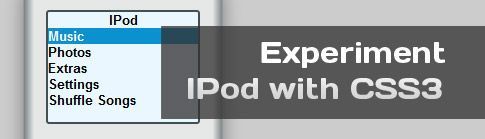
Experiment: Realistic Ipod with CSS3
May 27th, 2010 by Tweet
For today’s post, I got inspired by Ahmed El Gabri and his article CSS3 Gradients Coffee cup. I figured if you could make a coffee cup, you could make just about anything with CSS3! For example, today I created a realistic Ipod just with CSS3 and no images at all.
First of all, I recommend to do this with canvas; I just used CSS3 in order to better understand the gradient property in Safari and Chrome (webkit) and have some fun during the process of learning
.
Second of all, if you are going to check it out and want to get the full effect, I recommend Firefox, Safari or Chrome because they really support the gradients.
Lastly, feel free to read some of my other CSS3 tutorials to get a back ground on how it works!
HTML
<div id="ipod"> <div id="screen"> <ul> <li>IPod</li> <li>Music</li> <li>Photos</li> <li>Extras</li> <li>Settings</li> <li>Shuffle Songs</li> </ul> </div> <div id="button"> <span id="menub" class="btn">Menu</span> <span id="prevb" class="btn">«</span> <span id="nextb" class="btn">»</span> <span id="playpauseb" class="btn">›</span> <div id="centerbutton"></div> </div> </div>
CSS
#ipod { margin:0 auto 0 auto; height:423px; padding-top:23px; width:198px; background:-moz-linear-gradient(left, #798382, #e5e7e6 5%, #e5e7e6 95%, #798382 100%); background: -webkit-gradient(linear, left top, right top, from(#798382), color-stop(0.06, #e5e7e6), color-stop(0.94, #e5e7e6), to(#798382)); -moz-box-shadow: 0px 5px 25px gray; /* Firefox */ -webkit-box-shadow: 0px 5px 25px gray; /* Safari and Chrome */ box-shadow: 0 0 25px gray; font-family:Arial, Helvetica, sans-serif; border:1px solid #999; } #screen { width:150px; height:110px; border:3px solid #415053; margin-left:auto; margin-right:auto; position:relative; font-size:13px; background:#eaf7ff; font-weight:bold; padding:0; -webkit-border-radius:3px; -moz-border-radius:3px; } #screen ul { display:block; padding:0; cursor:pointer; margin:0; } #screen ul :nth-child(1) { text-align:center; } #screen ul :nth-child(1):hover { background:none; color:black; } #screen li { list-style:none; } #screen ul li:nth-child(2) { background:#0b91d0; color:#ffffff; } #screen ul:hover li, #screen ul:nth-child(2) { background:none; color:#000; } #screen ul li:hover { background:#0b91d0; color:#ffffff; } #button { width:150px; height:150px; -moz-border-radius:150px; -webkit-border-radius:150px; border-radius:150px; border:1px solid gray; margin:70px auto; background:#fbfcfe; } #centerbutton { width:70px; height:70px; -moz-border-radius:70px; -webkit-border-radius:70px; border-radius:70px; border:1px solid gray; margin:40px auto; background:-moz-linear-gradient(100% 50%, #e2e4e3, #ebedec); background:-webkit-gradient(linear, 0% 0%, 0% 100%, from(#e2e4e3), to(#ebedec)); } #menub { position:absolute; margin:10px auto 0 55px; } #prevb { position:absolute; margin:60px auto 0 10px; font-size:20px; } #nextb { position:absolute; margin:60px auto 0 130px; font-size:20px; } #playpauseb { position:absolute; margin:120px auto 0 70px; } .btn { font-weight:bold; color:#b5bfc8; }
Teylor Feliz is a well-known XHTML/CSS/JavaScript enthusiast from Santo Domingo, Dominican Republic. He has more than 10 years experience in the computer programming and development world, including 2 years teaching computer science. He is currently living in Louisiana, where he plans to complete his degree in Computer Science, and begin a Masters in the field.
Subscribe to our RSS
Please help us to promote this article.


I’ve got only one thing to say. WTF.
I love the new CSS3 since Ive started using it a week or two ago, but this is pretty awesome.
Keep it up.
yep I love CSS3 too! it can do some pretty cool stuff! Thanks for you comment
wow this is awesome!
Thank you
Glad you like it Colaja! Thank you for your comment
not much to say, but “wow”
it’s nice, thanks
Thanks fandy! Glad you like it!
Love it! Very cool man!
Thanks for commenting!
that’s awesome! Will it play tunes eventually?
Now that would be cool…might have to figure how to do it with CSS3…lol
Thats just very creative… mind blowing stuff… it amazes me what one can achieve with CSS3 :O
It not only amazes me, but excites me! How awesome is it!
You are voted!
Track back from WebDevVote.com.
That’s awesome. It’s like a Photoshop stuff. I salute you!
And there are no images! Shows how much can be done with CSS3
I am glad you enjoyed it! Thank you for your comment and come back soon!
Awesome… Inspiring stuff
-Deepu
Thanks Deepu! I was inpired by Ahmed El Gabri, now I hope I have inpired you to experiment with CSS3! Thank you!
I`m really flattered & honored that i inspired someone else to make something as beautiful as this , great job .
Hey Ahmed, I am glad you like! CSS3 has some pretty cool stuff! I just hope it will be able to be supported in all the browsers soon. Thanks for your comment and I hope you check out my blog again in the future!
actually we can use CSS3 now to some extend (round corners ,shadows, maybe gradients , advanced selectors ) but it all depends on the project and the audience of the site you are making, and if it won`t affect the main functionality of the site .
my site as an example is HTML5 & CSS3 if you viewed it in IE you will see the Buttons flat and not rounded this differences i can life with it also my visitors, cause they already don`t know what it looks like in Chrome or any other browser “except for the geeks they will check it in every browser they can
“.
that`s just my 2 cents & sure i`ll check your blog more
WOW!! Amazing job! Can’t believe how realistic it looks!
Glad you liked it, thanks for your comment.
Brilliant stuff buddy! At first I was like… whats the deal with the demo? it just has a list with a hover effect.. then I came back and read it carefully and was like LOL no images? *Bravo*
But then again, the question comes, is it really worth writing so much CSS rather than just using an image of the ipod?
I think there is no use for this! I just did this for fun and practice the shadow in webkit browsers.
The only practical example that I can see is in the case you have a product, for example the Ipod and you need to show the same product in different colors, like amazon or something. But you do not want to load 5 different images for 5 different colors. If you create the article with the shadows you just add the class of the color in JavaScript and done!
I really do not see this as very usable, it is more fun than anything else. This is a good way to get closer and understand the CSS3 deeper. Not everything that shines is gold, but rather this is a good example of what we can accomplish with CSS3.
Thanks for your comment!!!!
Dang! I can’t wait to see what the next generation of CSS3-enabled websites is going to look like. Everything will be so slick and polished!
Good morning, my dear brother
What struck me about the wonderful theme that did not
want to read it and do not set out for this innovation..
And tested this code css http://blogspacetech-ipod.blogspot.com/
but .. I tried to solve intractable
problem but to no avail..
good luck with you.